Security and data residency
Your people's details stay in Australia.
Hosted in Sydney with encrypted backup copies in Melbourne. AI processing runs in Australia only. Your content is never used to train AI models.
Who it’s for
Anyone who has to answer "where is our staff data, and who can see it?"
Included on
- Free
- Business
- Enterprise
- Dedicated
The audit log viewer comes with Enterprise and Dedicated.
Compare plans and pricesThe screens on this page are from a test workspace with made-up details.
What it does
Stored in Australia
Your questions, answers, files and account data are stored in Sydney, with encrypted backup copies in Melbourne. AI processing runs in Sydney and Melbourne only.
Encrypted, and then some
The database, files and backups are encrypted with managed keys, rotated automatically, and every connection uses TLS 1.2 or higher. Home addresses, emergency contacts and connection keys are also encrypted field by field, each with its own key.
An audit log you can read
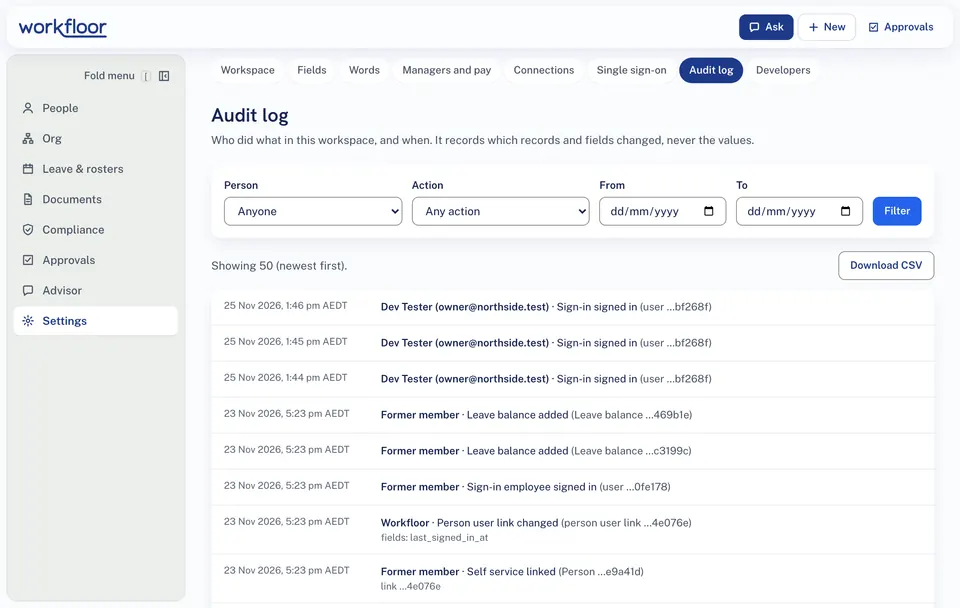
See who did what and when: filter by person, action and date, and download it as CSV. It records which records and fields changed, never the values.
Least access by default
Pay and personal details are for owners, admins and HR; managers see pay only if you switch it on. Staff see only their own record, and on Enterprise and Dedicated your accountant or lawyer can be given adviser access to view records and add notes.
Next step
Ask the Workfloor HR advisor
The advisor answers the question behind the screen, with the section of the law or the award clause it relies on. Your question is ready: press Ask and it’s answered straight away.
Starts with this question
What are an employer's privacy obligations for employee records in Australia?
Free to try: 2 questions, no card. Signed in? It’s answered as the advisor opens. New here? Create a free account and it’s answered straight away.
By creating an account you agree to our Terms and Privacy policy.
More of Workfloor
- People and org chartEmployee records with job and pay history, an org chart from manager lines, and your spreadsheet imported in one sitting.
- Leave and rostersLeave requests checked against the NES, balances from payroll, a team calendar, and rosters costed against the award.
- Self-service, onboarding and e-signStaff check their details, request leave and sign documents on their phone; onboarding runs from offer to day one.
- Approvals and Make a changeType a change in a sentence; the assistant prepares it with the award checked, and nothing is saved until you approve.
- Pay check and pay alertsPay checked against award minimums today and on known future dates, with back-pay and super estimated.
- Payroll connectionsBrings your people, pay rates and leave balances in from your payroll, read-only, with private fields left behind.
- Performance and casesPIPs, investigations, WHS incidents and flexible-work requests with legal deadlines; goals, one-on-ones and reviews.
- Reports8 ready reports you can ask for in plain English, from casual conversion to pay below the award.
- Compliance and toolkits77 employer obligations narrowed to yours, 55 documents and 6 HR toolkits.
- HR advisor with sourcesPlain-English answers on pay, leave and dismissal that cite the Fair Work Act section or award clause.
- EnterpriseSAML single sign-on, SCIM, a REST API, signed webhooks, an MCP server for AI tools, and a dedicated environment.
See it with real-looking data.
Look around a sample business with 30 made-up people, no sign-up. Or start free and bring your own.
By creating an account you agree to our Terms and Privacy policy.